Yuhox Stage.
On-site large-screen control. One screen, one rundown, the room follows you.
How to start
See the price and order
After payment, the license appears under Console → My licenses. Nothing is issued until the money arrives.
Collect the license in the software
In System settings → License, click “Get license with Yuhox account”. You do not copy a license code.
Machines without internet
Use Console → Offline activation / transfer. The license code is a secret; it is masked by default.
What it solves
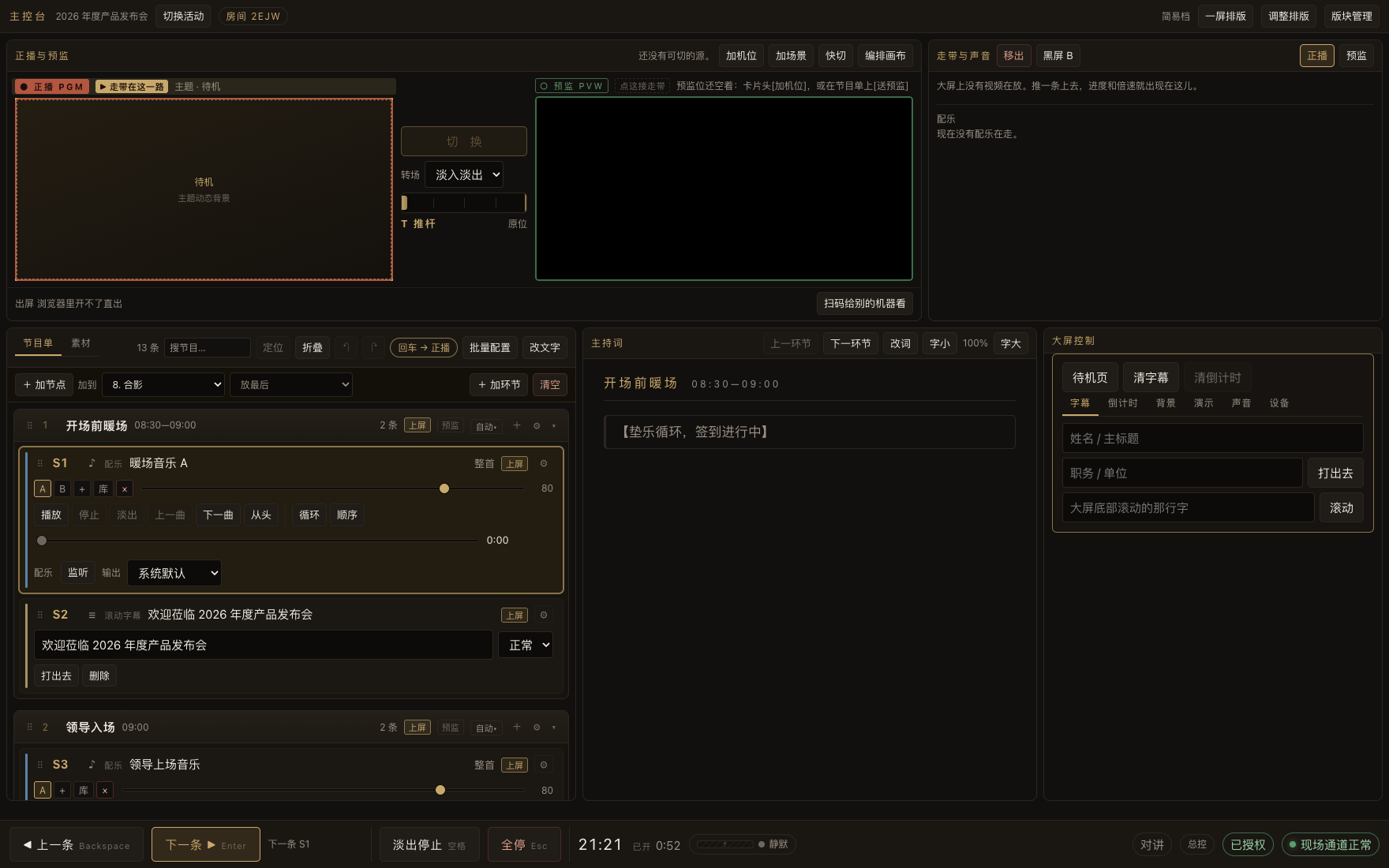
A conference on site usually looks like this: the slides on one laptop, the promo film on another, background music on a phone, subtitles typed live by the LED vendor, the launch-ceremony animation made by a third party, a camcorder set up for the archive, and a streaming operator called in for the live feed. Cuts happen by shouting, mistakes get patched on the fly, and one rehearsal eats half a day. Yuhox Stage puts all of it into one run sheet: one cue, one thing, Enter to move down. The big-screen canvas, multitrack audio and mixer, multi-camera switching, recording and streaming, tablet seats, extension linkage and lighting triggers are all in the same console. One person at the control table can run the whole event, with no dependence on the internet at any point.
Before and now
| Before | Now |
|---|---|
| Four or five devices each handling a piece; switching by shouting | One rundown advances in order. Who goes on, what plays, and which source to cut are set in advance. |
| Nobody knows where the presenter is in the script, and the visuals always lag | The script highlights as you go, so you can see exactly where you are |
| The speaker looks down at a teleprompter and shares one screen with the host | The speaker station has its own tablet. The script scrolls with the video, and font size can be changed on the spot. |
| Music has to change at the last minute, and nobody can find the file in a folder on site | Three music candidates per cue; the media library is searchable; missing media can be swapped on the spot |
| Speakers are on a satellite machine. If this machine makes sound, it feedbacks. | The machine can be muted while music still plays, meters still move and headphone preview still works; output routing is set in one place and applies everywhere |
| Archiving needs another recorder. Live streaming needs another encoder and operator. | Record and stream on the same panel; split files as it records; dropped frames and disconnects are logged |
| Multi-camera switching needs a separate video switcher and another person | Number keys on the cut panel go live directly; preview first, then take; PiP and split layouts apply in one press |
| A guest brings their own laptop on stage and HDMI is plugged in on the spot, hoping it works | The satellite client sends their screen to the large display; volume and which sound card are changed on the console |
| When the venue network blips, cloud media fails to load | All media stays local. Control runs on the LAN. Shows go on if the internet drops. |
| What you programmed for this event is useless next time. Every show starts from zero. | One folder per event. Copy it to another computer and you can start. |
Core capabilities
- 01
Rundown-driven
The whole show is one rundown. One cue, one action, Enter to go. The script highlights as you go, so the host can see exactly where they are.
- 02
Large-screen canvas
Visual layout of scenes and layers: color blocks, images, text, clocks, presentations, cameras, satellite screens, with transitions. Main and side screens are laid out separately.
- 03
Multi-camera switching
A row of live thumbnails. Number keys put a source on screen. Preview first, then push. Cut, dissolve, and T-bar. Picture-in-picture and five layouts apply with one press.
- 04
Record and stream
Record the program even with no camera; split files as it records, stop when the disk is full. The same panel pushes to WeChat Channels, Douyin, and Bilibili, with auto-reconnect and a log if the stream drops.
- 05
Mixer and sources
Music, video audio, satellite audio, and wireless mics each get a fader. Main output and preview are independent buses. Mute all external inputs in one tap, or silence this machine while the music keeps playing.
- 06
Four tablet seats
Signing seat (real handwriting lands on the contract), launch seat, host seat, speaker seat. Scan to join; no app. One click on the console brings them in.
- 07
Satellite linking
A guest laptop sends its screen to the large display, a machine at the far end of the hall is an output node, a second computer is a sub-console. What it plays, how loud, which sound card: all changed on the console.
- 08
Media library and AI rundown
Drop in the whole media folder and it is recognized into groups and sections. The software gives you a prompt; send it with the client's run-of-show to the AI you already use. Paste the returned config back in and it expands into a rundown.
- 09
Lighting follow
Art-Net / OSC / webhook / serial follow the cue; lighting no longer depends on shouting.
- 10
Offline first
Media stays local, control runs on the LAN. The show goes on if the venue loses internet. There is no Save button; changes are saved as you go, and forced to disk before exit.
Who it is for
Conference production firms, event organizers
One person runs the room. Rehearsal shrinks to a single walkthrough.
Corporate admin and events
Year-end meetings, launches, and kickoff ceremonies that do not go wrong, with a reusable flow
Venue technicians
Take whatever event comes in; you do not rebuild a setup for each one
Organizers who need recording and live streaming
Recording, streaming, and multi-camera work you no longer want to outsource to a crew
Why this one
Rundown-driven, not screen-driven
Most playback software has you drive the picture. Yuhox Stage has you drive the process. The process is the real structure of an event; the picture is just its output. Last-minute insertions, skips and rollbacks all keep up — the host changing words on the spot needs no resequencing.
One software stack covers switching and live streaming
Big screen, audio, multi-camera switching, recording and streaming in one console — not "playback software plus a video switcher plus a streaming rig". Three fewer machines, two fewer people, one fewer place for things to break.
The speaker station is a separate screen
The speaker has their own tablet: the script scrolls with the video, audio, or auto-advance, with an overall progress bar and live font-size control. Presenters using PowerPoint can turn pages themselves, and the same screen shows which slide is currently on the main display.
Source management is taken all the way
One key mutes every sound coming in from outside; conversely, it can silence this machine while music and video inside the software keep playing, level meters keep moving and headphone pre-listening keeps working. For venues whose speakers hang on the extension, this is a must-have.
A satellite is a controlled endpoint, not another computer
Once a guest laptop, a far-end output machine or a second sub-console is connected, what it plays, how loud, which sound card, mute or not, is changed on the main console, and the change arrives on that machine at once.
Offline first
Unstable on-site networks are the norm. Media is local, control runs on the LAN, and licenses check offline, so a show is not affected if the internet drops. This is not a “cloud version with a few features cut.”
The cost of getting it wrong was thought through in advance
Recording splits into files; a crash costs at most ten minutes. When the disk is nearly full it stops itself and alerts. If streaming dropped once, that badge stays up so you do not pretend it did not happen. If you let go of the T-bar mid-move, nothing is sent. There is no Save button; changes are saved as you go.
AI rundown
The software generates a prompt based on what your event contains; send it along with your run sheet, hosting script and guest list to any AI, then paste the returned configuration back into the software — segments, script, teleprompter cards and music cues are all set at once, no typing line by line. Drag an asset folder in and it groups and files items automatically.
Same job, two ways
The left column describes how most venues actually work today, not any specific vendor version; the right column describes the current software, based on what you see in the trial.
| Topic | Common practice | Yuhox Stage |
|---|---|---|
| How the show advances | Manually advance slides in a graphics tool and rely on someone to remember the order | One cue, one action. Press Enter to advance; insert, skip, or go back as needed |
| Presenter script | Paper notes or a separate Word file — only the speaker knows where they are | The script highlights as you go; console and presenter tablet stay in sync |
| Speaker on stage | Share a teleprompter with the host, or have none at all | Speaker station has its own tablet. The script scrolls with the video, audio, or auto-advance. |
| Multi-camera | Add a separate switcher, then someone to sit on it | Built-in cut panel: number keys take it live, preview, T-bar, PiP, five layouts |
| Recording archive | Set up a recorder, then line it up to the timeline afterwards | Software capture: record the program even with no camera; split files as it records, stop when the disk is full |
| Live streaming | Then call in another streaming kit and another operator | The same panel pushes to WeChat Channels, Douyin, and Bilibili. Dropped frames and disconnects are all logged. |
| Audio | Music lives on a phone, patched into the mixer with a cable. Volume is shouted across the room. | Multi-track engine plus software mixer; main output and preview buses are independent |
| External audio and local mute | Unplug the cable, or dig through system settings | Source management cuts all external inputs with one click. This machine stays silent while music still plays. |
| Guest's own computer | Plug HDMI in on site and hope the resolution and volume are right | The satellite client sends the screen to the large display; channel, volume, sound card and mute are changed on the console |
| Signing and kickoff ceremonies | Outsource a clip of animation and hit spacebar to play it on site | Tablet signing (real handwriting lands on the contract), launch seat, built-in countdown |
| Lighting | The lighting operator waits for verbal cues | Art-Net / OSC / webhook / serial follow the cue automatically |
| Plan an event | Type the client's process sheet into the software, item by item | The software writes a prompt; your AI returns a config; paste it back and it expands into a rundown. Drag a media folder in and it files itself |
| Network | Solutions that depend on cloud media and online activation are at the mercy of the venue network | Media stays local, control runs on the LAN, licenses verify offline. The show goes on if the internet drops |
| Switch computers | Reinstall, reconfigure, hunt down assets again | One folder per event. Copy the whole folder and you can start. |
| Trial | Trial versions usually limit live features | All on-site features are on. The trial is 1 event with a watermark on the main screen; installing a licence removes it at once. |
Key parameters
| Output channels | Main screen / side screen / director view, programmed separately |
|---|---|
| Large-screen canvas | Scenes + layers: color blocks, images, text, clocks, presentations, cameras, satellite screens, with transitions |
| Video input | Camera / HDMI capture card / this machine's screen / video file |
| Multi-camera switching | Preview + program, cut / dissolve / T-bar, picture-in-picture, five layouts, number-key take |
| Record | Program output or a chosen camera, 720p30 by default, split into files as it records, stops when the disk is full |
| Streaming | RTMP (Channels / Douyin / Bilibili); requires local ffmpeg; auto-reconnect on drop |
| Audio | Multi-track fade in/out / crossfade / ducking; main output and preview buses are independent |
| Source management | Cut all external inputs with one click. Mute the local machine while audio inside the software still plays. |
| Tablet seats | Signing, launch, host, and speaker seats. Scan to join; no app |
| Satellite client | Satellite picture / output node / satellite console; audio and sound card are set remotely from the main console |
| Hardware panel | MIDI controller; Stream Deck via hotkeys, ready once configured |
| Lighting follow | Art-Net / OSC / webhook / serial |
| Number of seats | No limit on tablets, signing seats, satellite stations, or screen count. Licensing is per host |
| Platform | Windows 10+ / macOS 12+; double-click after install, no database to set up |
| Network | The site only needs a working LAN. Internet is not required. |
| Save | No save button. Changes persist immediately. A forced write to disk happens before exit. |
The features and parameters above describe the current released version; later versions may change. The software is available for a download trial, and the trial has all on-site features enabled. Judge by what you actually see on your own equipment and venue — don't place an order on this page's description alone. Anything that needs to go into procurement documents is governed by the contract and technical agreement both sides sign.
Up front
Do you need dedicated hardware?
A single-screen small meeting can go HDMI straight from a laptop. Main plus side screens want a workstation with a dual-output graphics card; add a capture card if you need a video switcher. The capture card looks like a camera to the system; no extra driver setup.
Will it replace a video switcher?
Small and mid-size venues are fine: the switching panel has preview, faders, picture-in-picture and the common layouts — enough for the job. For a real large multi-camera live broadcast, a hardware switcher is still the safer call; the two can coexist — Yuhox Stage runs the run sheet and big-screen content, the switcher handles the cuts.
Do I need extra equipment for livestreaming?
No. Push RTMP from inside the software; fill in the address and stream key the platform gives you. This machine must already have ffmpeg. Install it before you leave; at the venue it often will not download. The console opened in a browser cannot push; only the desktop app can.
Will recording bring this machine down?
The 720p30 default was weighed. This machine is also driving the big screen and the music at the same time. If you want 1080p, try a full run during rehearsal first. Recording writes to disk in segments — a mid-event crash costs at most the last ten minutes, and when the disk runs near full the software stops itself and raises an alert.
Do tablets need an app?
No. Scan a code to join, then click once in the console to bring it in. Any number of tablets, any number of licensed seats. The license counts the main control machine; nothing connected to it is verified again.
Can we change the rundown at the last minute?
Yes, it keeps up. Insertions, skips and rollbacks are supported, and the host changing words live is fine. That's exactly where a run-sheet-driven tool beats a picture-driven one.
Does it work if the venue has no network?
Yes. The site only needs a working LAN (one router is enough); internet is not required. Media stays local, licenses verify offline, and the whole show never touches the cloud.
What can I do without buying a license?
You can create 1 event. Live features are fully on: nothing is locked, no pop-ups, no stoppage. The main screen has a watermark and exports are marked trial. Installing a licence removes them at once.
Does it support Stream Deck?
Yes. It uses hotkeys, not MIDI. Map the keys as hotkeys in Elgato’s own software. Yuhox Stage needs no setup, and it still works if you switch computers. Faders and knobs on MIDI controllers are a separate hardware-panel path.
Can this show's rundown be reused next time?
Yes. One folder per event. Rundown, media, music choices, levels, and subtitle edits all live in it. Copy the folder to another computer and you can start.
One account, multiple systems
If you use several Yuhox systems, one account covers them all. No separate accounts or passwords per system.
You have an event to run
Send us the process sheet. We will walk through it and show you where things most often go wrong.